
The 5-minute home office daily reset returns today’s loose items, paper, cables, and small trash to assigned homes in five timed steps. Run it at the same time every evening, and the desk re-starts blank the next morning. For the broader system, see the home office organization hub and the home office desk organization guide.
Quick answer: The 5-minute home office daily reset is an end-of-day sweep that returns today’s loose items, paper, cables, and small trash to their assigned homes in five timed steps: Set the timer, Sweep loose items to a catchall, Triage paper, Tame cables and wipe surfaces, and Sanity check + close-out. Run at the same time every evening and the desk re-starts blank the next morning.
Why Home Offices Get Messy Every Day
Three streams hit the home-office desk daily: physical drop (receipts, mail, coffee cups), digital drop (charging cables, earbuds), and cognitive drop (sticky notes). Without a daily reset, those streams accumulate the way a kitchen sink fills with dishes — slow enough to ignore for three days, overwhelming by day five.
Home offices get messier faster than corporate offices for three reasons: no cleaning crew, no shared storage standards, and the desk doubles as dining-table and kid-homework surface after 6pm. The goal is not a clean desk — it’s that tomorrow morning, we open the laptop and the desk is ready. For the broader reset framework, see the declutter maintenance routine.
What the reset is NOT
- Not a deep clean. Sweep, wipe, triage — no reorganizing.
- Not a paper purge. Triage into three stacks is the goal, not going through every drawer.
- Not a productivity system. The reset is the maintenance loop for the systems already in place.
The 5-Minute End-of-Day Method
The 5-minute method is a fixed sequence with a visible timer. Order matters: do Step 1 first every time, do Step 5 last every time, and do not re-order based on what looks worst. The sequence is calibrated for an evening where energy is low but willpower for “one last thing” is high.
The 5-step reset at a glance
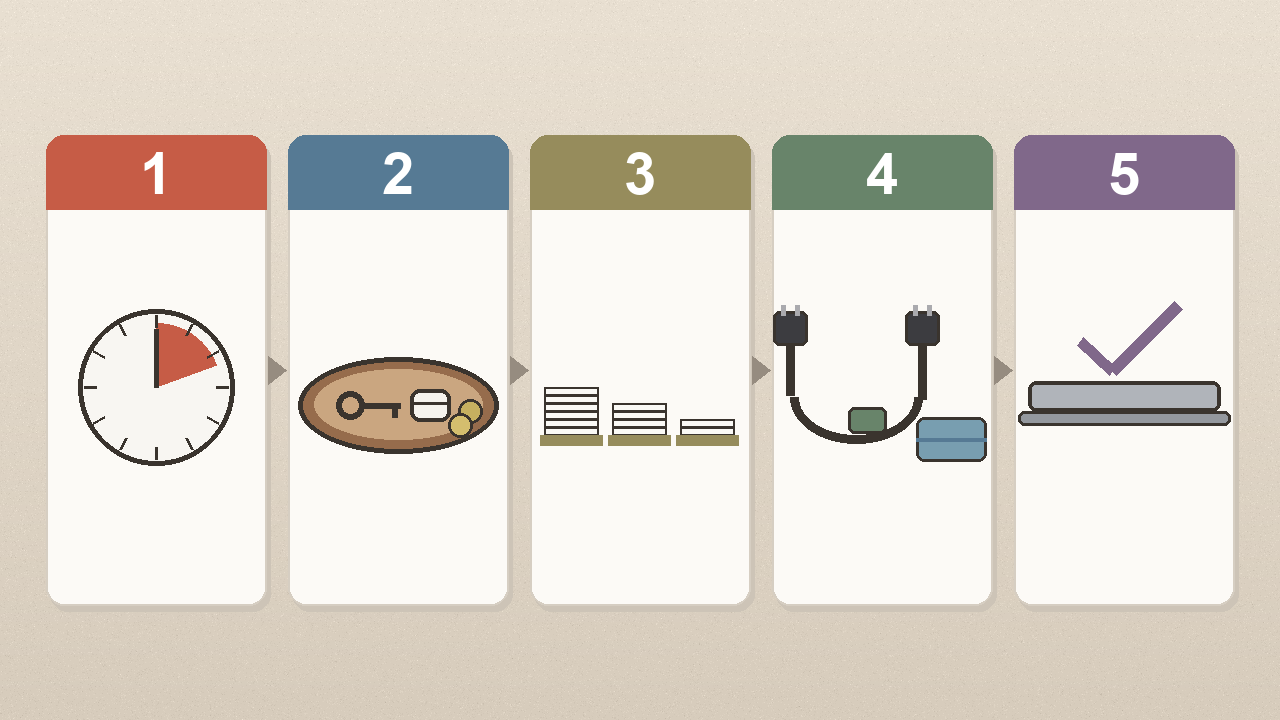
Step 1 — Set the 5-Minute Visible Timer

Place the TIME TIMER PLUS 5-Minute Visual Timer on the desk corner where we can see the disc disappear. Press start. The timer has two jobs: it bounds the reset at 5 minutes, and it makes the reset visible to anyone else in the room. If the timer runs out mid-step, finish the current step.
Step 2 — Sweep Loose Items to a Catchall
Pick up everything that does not belong on the desk: coins, earbuds, sticky notes, paper clips, pens, receipts, charging cables. Drop them into the SITHON Valet Tray Desktop Organizer — a single catchall tray keeps loose items in one spot.
For items that need to leave the desk entirely, stick a Post-it Page Marker on them so they stay visible but are flagged as out-of-here tomorrow. This prevents the catchall from becoming a stuff graveyard.

Step 3 — Triage Paper Into 3 Stacks
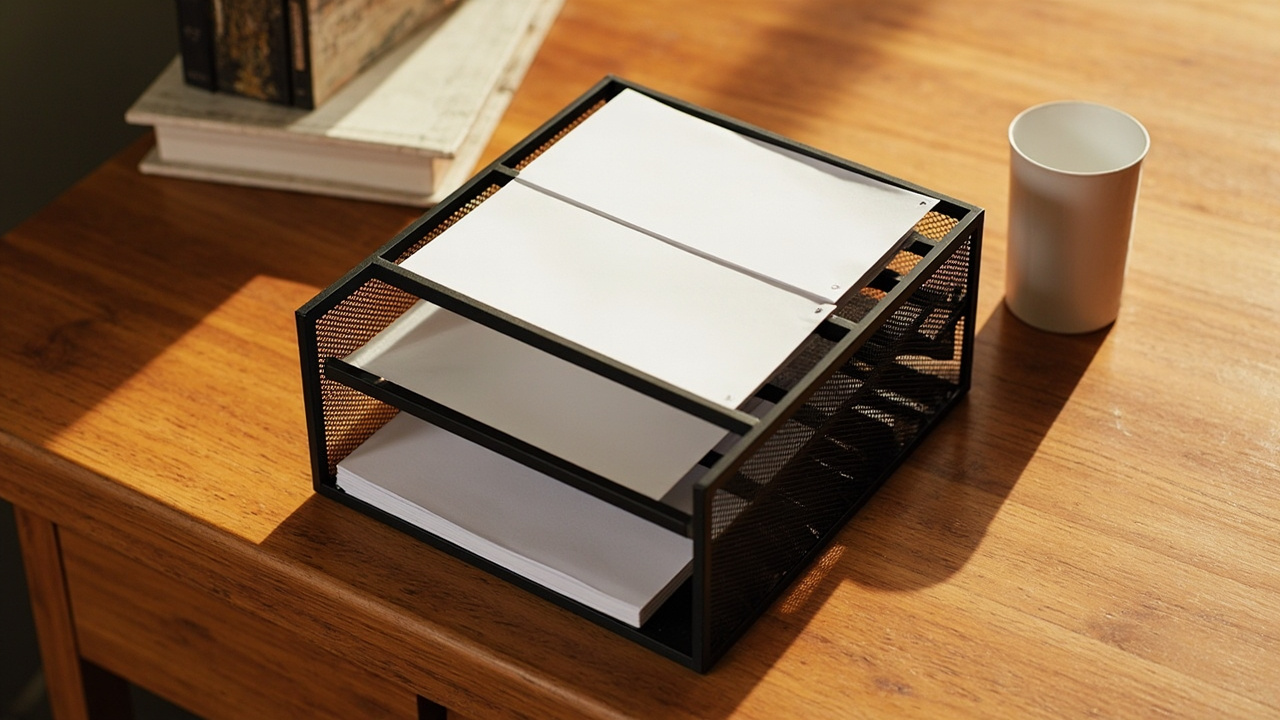
Paper is the only stream that requires a decision. Pick up every paper on the desk and place it into one of three stacks in the Delifox Inclined Desk File Organizer:
- Action (front) — bills to pay, forms to sign, calls to make this week.
- File (middle) — records to keep, statements to archive.
- Recycle (back, lined with the XZZWLL Mini Trash Can) — junk mail, expired coupons, scratch printouts.
The Action stack has a hard rule: anything in Action stays for at most seven days, then moves to File or Recycle. If Action has more than five items at the end of the reset, next morning’s first task is paper triage, not email triage. See our home office paperwork system sister article.
Step 4 — Tame Cables and Wipe Surfaces
Two sub-tasks, ninety seconds total:
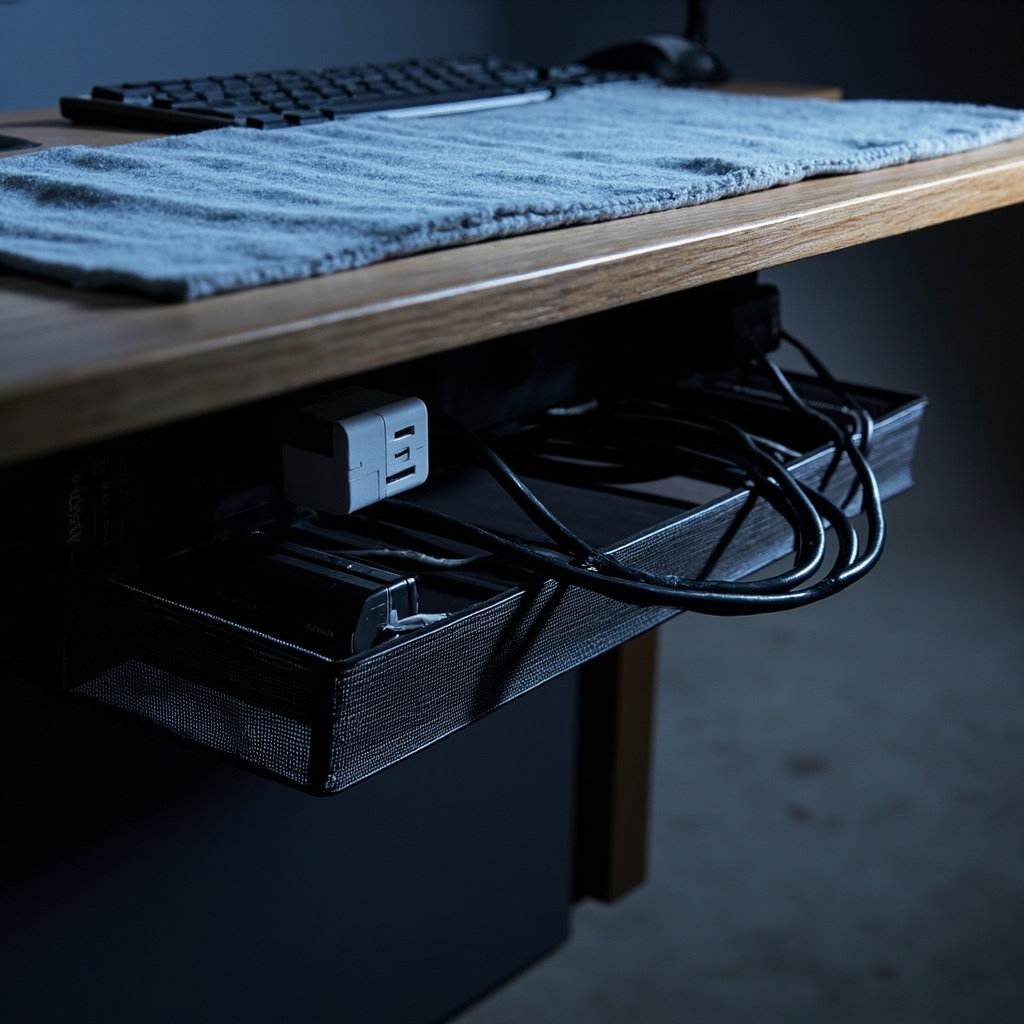
Cable sweep (45 sec): any charging cable not in active use gets coiled and dropped into the Mzmaxy Under-Desk Cable Tray — a clamp-mounted basket that catches the wall-wart octopus. Wall-warts left on the floor are the leading cause of “I can’t find a charger” scrambles. See the home office cable management guide.
Surface wipe (45 sec): one MagicFiber Microfiber Cloth wiped across the keyboard, monitor bezel, and desk surface. Microfiber is lint-free — safe for screens and glass. Do not spray cleaner directly on electronics.
Step 5 — Sanity Check + Close-Out

Take ten steps back from the desk. Look at it for ten seconds. The reset is done if the desk shows only:
- Closed laptop (or monitor plus keyboard, no loose items)
- One pen in a pen cup
- Empty desk surface (no paper, no cables, no cups)
- The catchall tray with zero to three items
If anything else is visible, return to Step 2 for another sixty seconds. don’t restart the timer for a second pass — the goal is “blank desk in five minutes,” not “perfect desk in seven.” Close the laptop, stand up, the reset is complete.
Layout by Office Setup
The 5-step method is the same regardless of office size. The product kit and the Step-3 paper capacity are what change.
Small Desk (under 30 inches wide)
No room for a vertical mail sorter. Use a single horizontal letter tray for the Action stack, and move File and Recycle to a shelf above the desk. The catchall tray is the SITHON Valet Tray only — skip the file sorter. Cable tray sits under the desk on the same edge as the wall outlet. See small home office storage ideas.
Shared Room (Spouse or Kid Homework at Same Table)
Run the reset twice per evening — once after the kid leaves, once after the adult leaves. The catchall tray lives at the adult’s end. Use Post-it Page Markers to tag anything that belongs to the other household member.
Dedicated Home Office (door, full desk, multiple surfaces)
The 5-minute reset covers the desk and the immediate desk-edge surface. Add a 60-second walk-around in Step 5 that picks up items from the floor, the chair, and the printer shelf.
Hybrid Remote Worker (3 days office, 2 days home)
Run the reset only on home-office days, not every evening. Tuesday / Thursday home reset plus Friday “week reset” is enough.
Build the Reset Into a Habit
The reset fails not because the steps are wrong but because there is no trigger. Tying the reset to an existing evening habit is what converts a 5-minute task into a 21-night streak. Three triggers work:
- Dinner dishes trigger — sit down at the desk the moment the dishes are loaded.
- Last-meeting trigger — finish the last video call, take 5 minutes, then close the laptop.
- Commute-equivalent trigger — even remote workers benefit from a 10-minute decompression buffer after the workday.
The habit loop at a glance
The reset is a habit loop: Cue (dinner dishes trigger) → Routine (5 timed steps) → Reward (blank desk tomorrow plus the visible timer disc hitting zero). The reward is delayed by 12 hours, which is why the visible timer matters — it provides an immediate reward tied to the routine. Without it, the routine is invisible. See the declutter-fast method.
When the reset breaks (Skip-Day Recovery)
Skipped days are part of the system, not a system failure. The recovery protocol:
- 1 missed → resume the next evening, no penalty.
- 2-3 missed → Sunday 15-minute catch-up reset.
- 4+ missed → switch to a Monday / Wednesday / Friday cadence for two weeks.
A single skipped night is not a signal to give up. See our declutter maintenance routine.
When the Reset Does Not Apply
The reset is a maintenance loop, not a one-time fix. It does not apply in five situations:
- End-of-project cleanups — we do a deep-clean sweep, not the 5-minute reset.
- Moving days — packing or unpacking resets a different muscle.
- Travel days — replaced by a 30-second “lid closed, cable wrapped” close-out.
- Sick days — energy conservation overrides maintenance.
- First 30 days in a new home office — the reset cannot exist until the assigned homes exist.
Constraint Guide by Scenario
The 5-minute reset breaks predictably when office setup doesn’t match the published system. These five scenarios cover the common ones.
If you rent and cannot drill the desk
Use a clamp-mounted cable tray and an adhesive-mount catchall tray. Skip the wall-mounted mail sorter; use a desktop Delifox Inclined Desk File Organizer instead.
If your desk is in a shared room (dining table or bedroom corner)
Run the reset twice — once before dinner, once after. The catchall tray must be removable: it goes in a drawer during dinner and comes back after. The visible timer TIME TIMER PLUS is the social cue.
If you work a hybrid week (3 days office, 2 days home)
Skip the reset on office days. Run it only on home-office days. The catchall tray SITHON Valet Tray stays on the desk across office days. See the home office desk organization guide for the day-end flow.
If you have ADHD or executive-function challenges
The visible timer is the main tool — without it, the reset runs until energy runs out (often 25+ minutes). The catchall tray SITHON Valet Tray must be opaque, not open. The 5-step method is non-negotiable.
If you receive 10+ pieces of paper per day (high-volume mail)
The Action compartment of the mail sorter Delifox Inclined Desk File Organizer will overflow within three days. Add a second sorter for “Action This Week” versus “Action Next Week.” A Brother Label Maker is essential — pre-printed labels keep the 7-day rule enforceable. For the labeling approach, see our labeling guide.
What You’ll Need
The 8-product kit is divided into the 5 reset steps. A solo home-office worker can start with four products and add the rest as the habit sticks.
Minimum kit (4 products, under $80)
- P1 TIME TIMER 5-min ($29.95) — Step 1 anchor.
- P2 SITHON Valet Tray ($15.99) — Step 2 catchall.
- P4 Delifox Mail Sorter ($22.49) — Step 3 paper triage.
- P8 XZZWLL Mini Trash ($9.98) — Step 3 Recycle destination.
Total: $78.41. Start with timer plus trash at $39.93 if budget is tight.
Full reset kit (8 products, under $160)
- P1 + P2 + P4 + P8 above.
- P3 Post-it Page Markers ($4.83) — Step 2 off-desk flagging.
- P5 Mzmaxy Cable Tray ($20.39) — Step 4 cable management.
- P7 MagicFiber Microfiber (6-pack) ($9.98) — Step 4 surface wipe.
- P6 Brother PTD220 Label Maker ($44.99) — weekly bin/tray labeling.
Total: $156.76.
The 8-product home office reset kit at a glance
| Step | Product | Role | Cost |
|---|---|---|---|
| 1 | P1 TIME TIMER | Timer anchor | $29.95 |
| 2 | P2 SITHON Valet Tray | Loose-item catchall | $15.99 |
| 2 | P3 Post-it Page Markers | Off-desk flagging | $4.83 |
| 3 | P4 Delifox Mail Sorter | Paper triage (Action / File / Recycle) | $22.49 |
| 3 | P8 XZZWLL Mini Trash | Recycle destination | $9.98 |
| 4 | P5 Mzmaxy Cable Tray | Cable management | $20.39 |
| 4 | P7 MagicFiber Microfiber | Surface wipe | $9.98 |
| weekly | P6 Brother PTD220 Label Maker | Bin/tray labeling | $44.99 |
| Total | $156.76 |
Common Mistakes
These five failure patterns appear in home-office organizer forums within the first month of trying a daily reset.
-
Skipping the visible timer. Without the TIME TIMER, the reset drifts to 12 minutes and becomes easy to skip after four nights.
-
Using a drawer for the catchall instead of a tray. A drawer hides loose items, which causes “I lost my keys” mornings. The catchall tray SITHON Valet Tray must be on the desk surface, single-compartment.
-
Letting paper stack on the keyboard overnight. One piece becomes five by the next morning. Step 3 paper triage with the Delifox Mail Sorter plus XZZWLL Trash is the key step.
-
Doing the reset at the wrong time. 9pm after kids are in bed fails because adults are tired. 4pm fails because accumulation is not done. The trigger is the moment the day’s work is done — typically 5:30 to 6:30pm.
-
Treating a missed reset as a reset failure. A skipped night is a signal that the trigger or kit needs adjusting. Use the Skip-Day Recovery protocol and resume the next evening.
Key Takeaways
- The 5-minute reset works because it is bounded — the visible timer (TIME TIMER) keeps the routine at 5 minutes.
- Three streams hit the desk daily: physical, digital, cognitive drop. The reset catches all three.
- The catchall tray (SITHON Valet Tray) must be on the desk surface, not in a drawer.
- Paper triage (Step 3) is the key step — Action has a hard seven-day rule.
- The reset fails from missing triggers, not wrong steps. Tie to an existing evening habit.
- Skip-day recovery is built in: 1 missed = resume, 4 or more missed = switch cadence.
- Cable management (Mzmaxy Tray) is the leading cause of morning scramble. For the full cable system, see the home office cable management guide.